
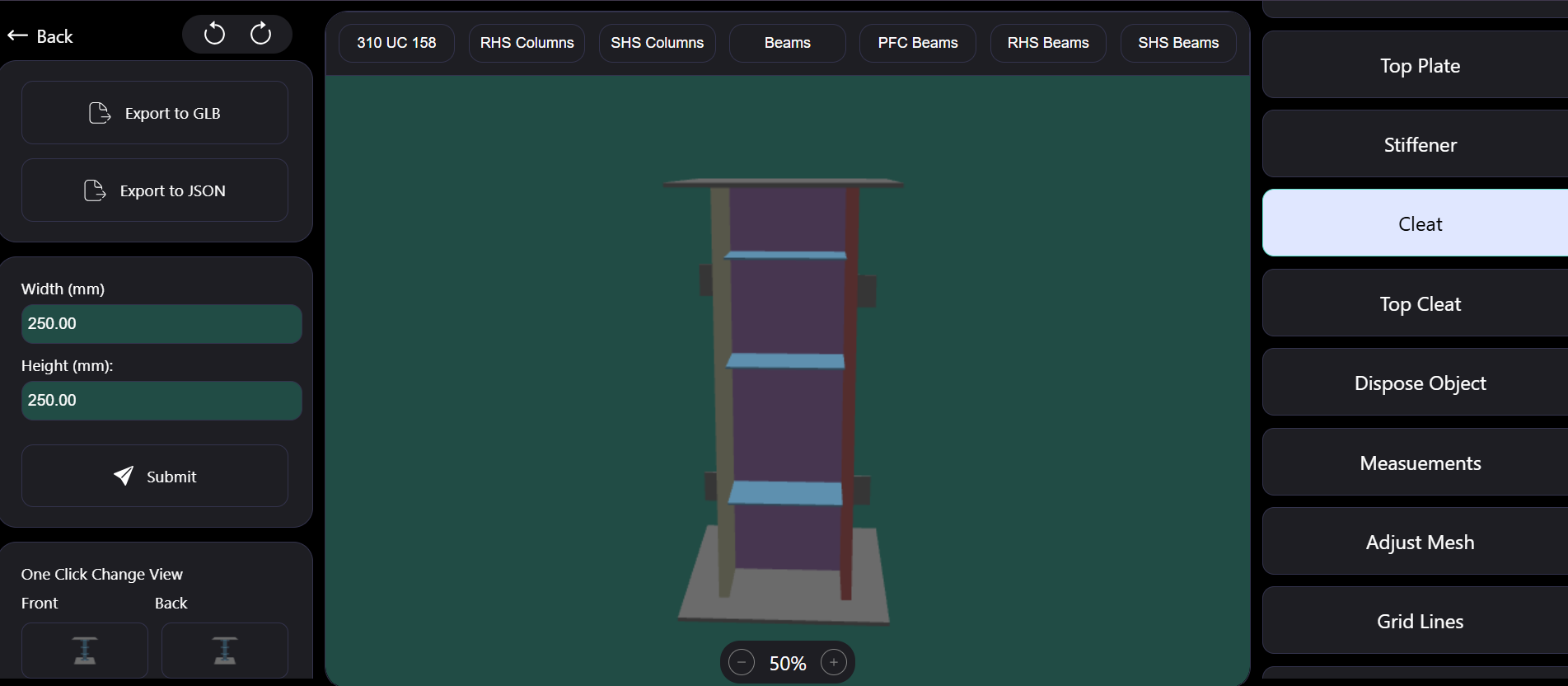
In steel fabrication, quoting is often slower than it should be. An estimator needs to assemble a column or beam, add plates and cleats, check dimensions, and work out the material cost, and too often that means opening desktop CAD or working from a spreadsheet and a sketch. If you are researching how to build a 3D product configurator for manufacturing that runs in the browser, this guide walks through the one we built with Babylon.js and WebGL, including the engineering decisions behind live editing, cost calculation and exports.
The worked example is our Steel Fabrication Configurator, a production-ready tool that lets engineers and estimators build standard steel members in 3D and see their cost update as they work.
Why build a browser-based 3D configurator instead of using CAD
The client's requirement was specific: engineers and estimators needed to assemble standard columns and beams, add plates, cleats and stiffeners, and see the material cost the moment a dimension changes, directly in the browser, without a desktop CAD seat. Quoting accuracy depended on precise measurements and repeatable views.
Full CAD software is built for detailed design, and it is excellent at that. But for quoting and early configuration, it is more than most people in the process need, and it is not something you hand to every estimator. A focused web configurator does a narrower job well: it covers the standard parts and operations your business actually sells, runs on any machine with a modern browser, and produces outputs that slot into the rest of your workflow.
We regularly tell manufacturers that a configurator should not try to replace CAD. It should take the repetitive, rules-based part of the work out of CAD so detailers can focus on the jobs that genuinely need it.
Why we chose Babylon.js and WebGL
The configurator is built on Babylon.js with plain JavaScript, rendering through WebGL. Babylon.js is a full 3D engine rather than just a rendering library. It provides cameras, lighting, mesh creation, picking (working out what the user clicked on), and built-in support for exporting scenes, all of which a configurator relies on. Its documentation and tooling are mature, which shortens the time spent solving problems that other teams have already solved. The Babylon.js documentation is a good starting point if you are evaluating it.
The deployment is deliberately simple: a static front end on Vercel. There is no server-side rendering of 3D; the user's browser and GPU do the work, which keeps hosting cheap and the experience responsive.
How the 3D configurator works: meshes, parts and live editing
Standard sections as parametric meshes
The configurator supports standard columns and beams, including profiles such as UC, RHS, SHS and PFC. Each member is a mesh generated from parameters rather than a fixed imported model. That is what makes real-time mesh dimension editing possible: when a user changes width, height or depth, the configurator rebuilds or rescales the geometry instantly instead of loading a different file.
Fabrication features
On top of the main member, users add the parts that turn a section into a fabricated piece: base and top plates, cleats, a top cleat, stiffeners and holes. Each feature is attached to its parent member, so moving or resizing the member keeps the features in the right place. Getting these parent-child relationships right early is one of the most important structural decisions in a configurator.
Selecting, resizing and safe disposal
Users can select, resize and remove objects. Removal sounds trivial, but in a WebGL engine it is not. Meshes, materials and textures hold GPU memory, and if you remove an object from the scene without disposing of it properly, memory leaks build up over a long editing session until the page slows down. Safe disposal means cleaning up every resource an object owns when it is deleted.
Undo and redo
Iterative design needs undo and redo. The usual approach, and the one that fits this kind of tool, is to record each user action as a reversible step in a history stack, so the scene can be moved backward and forward without losing data. Undo has to account for disposal too: an object that has been deleted must be restorable if the user changes their mind.
Real-time cost calculation from material usage
The feature that justifies the whole project commercially is automatic cost calculation. Every time a dimension changes or a feature is added, the configurator recalculates cost from material usage.
Conceptually this is straightforward: each part's geometry determines its material quantity, and pricing rules turn quantities into a cost. The engineering work is in keeping the calculation tied to the same parameters that drive the 3D model, so the price and the picture can never disagree. If they are calculated separately, they will eventually drift, and an estimator will quote a part that does not match what they see.
If you are planning a configurator, agree the pricing rules with the people who own them before any code is written. Rules that live in someone's head are the hardest part of these projects, and the 3D work is usually the easier half.
Measurement tools, grid lines and orthographic views
Accuracy in a quoting tool depends on people being able to check what they have built. The configurator includes grid lines and measurement tools, plus six one-click orthographic views: front, back, left, right, top and bottom.
Orthographic views matter because perspective cameras distort size with distance. Engineers are used to reading elevations and plans, and an orthographic camera shows dimensions without that distortion. Making each view one click away gives users repeatable views they can trust, which is exactly what the original requirement asked for. Good interaction design here is as important as the rendering, which is why our UI/UX design team treats configurator controls as a product in their own right.
Exporting GLB and JSON for CAM and ERP workflows
A configurator is only useful if its output goes somewhere. Finished configurations export in two formats:
- GLB, the binary form of glTF, for 3D visualization. It can be shared with customers, embedded in other viewers, or used in presentations.
- JSON, describing the configuration as structured data, for downstream integration with detailing, CAM or ERP systems.
The JSON export is the more strategically important of the two. It means the configuration is data, not just a picture, and other systems can read it. If you later want to push quotes into an ERP or generate cutting lists, the structure is already there. You can try the configurator on its live demo.
What to decide before building your own configurator
If you are considering a 3D product configurator for your own products, a few questions decide most of the cost and risk:
- Which parts and operations are standard? A configurator works best on a defined catalogue. Truly one-off work belongs in CAD.
- Who owns the pricing rules? Someone has to agree and maintain them, and they need to be written down before development starts.
- Where does the output go? Decide early whether exports feed a quote, a detailing package, a CAM system or an ERP, because that defines the JSON structure.
- Who are the users? Internal estimators and external customers need very different levels of guidance in the interface.
Answering these up front keeps the first release focused and makes later integrations far cheaper.
Frequently Asked Questions
Is Babylon.js good for building a product configurator?
Yes. Babylon.js provides a complete WebGL engine with cameras, lighting, mesh tools, picking and GLB export, which covers most of what a configurator needs. It is a strong fit for engineering-style tools where precision matters more than visual effects.
Can a web-based 3D configurator calculate prices in real time?
It can, provided the pricing logic is driven by the same parameters as the 3D model. In the Steel Fabrication Configurator, cost is recalculated automatically from material usage whenever a dimension or feature changes.
What file formats should a manufacturing configurator export?
Usually one format for visuals and one for data. This project exports GLB for 3D visualization and JSON for detailing, CAM or ERP integration.
Does a browser configurator replace CAD software?
No. It handles standard, rules-based configuration and quoting quickly, while detailed design work stays in CAD.
The full project summary is on the Steel Fabrication Configurator case study, and this kind of work sits within our custom web development service. If your quoting process depends on CAD seats or spreadsheets, talk to us. We will tell you plainly whether a configurator will pay for itself in your case.